# reBot B601
The reBot B601 is an open-source robot arm from Seeed Studio for imitation learning and embodied AI. A setup pairs a 6-DOF follower arm with a gripper and a reBot Arm 102 leader for teleoperation.
The follower is available with Damiao (DM) or RobStride (RS) motors. Both builds use the same LeRobot robot type and joint names; select the hardware with `--robot.motor_family`.
| Build | `motor_family` | Motors | Default connection |
| ------------------------------------------------------------------ | -------------- | ---------------------------------------- | -------------------- |
| [B601-DM](https://wiki.seeedstudio.com/rebot_arm_b601_dm_lerobot/) | `dm` | Damiao (`4340P` base, `4310` wrists) | Damiao serial bridge |
| [B601-RS](https://wiki.seeedstudio.com/rebot_arm_b601_rs_lerobot/) | `rs` | RobStride (`rs-06` base, `rs-00` wrists) | Native CAN |
This guide covers hardware setup, calibration, teleoperation, and recording for single-arm and bimanual setups.
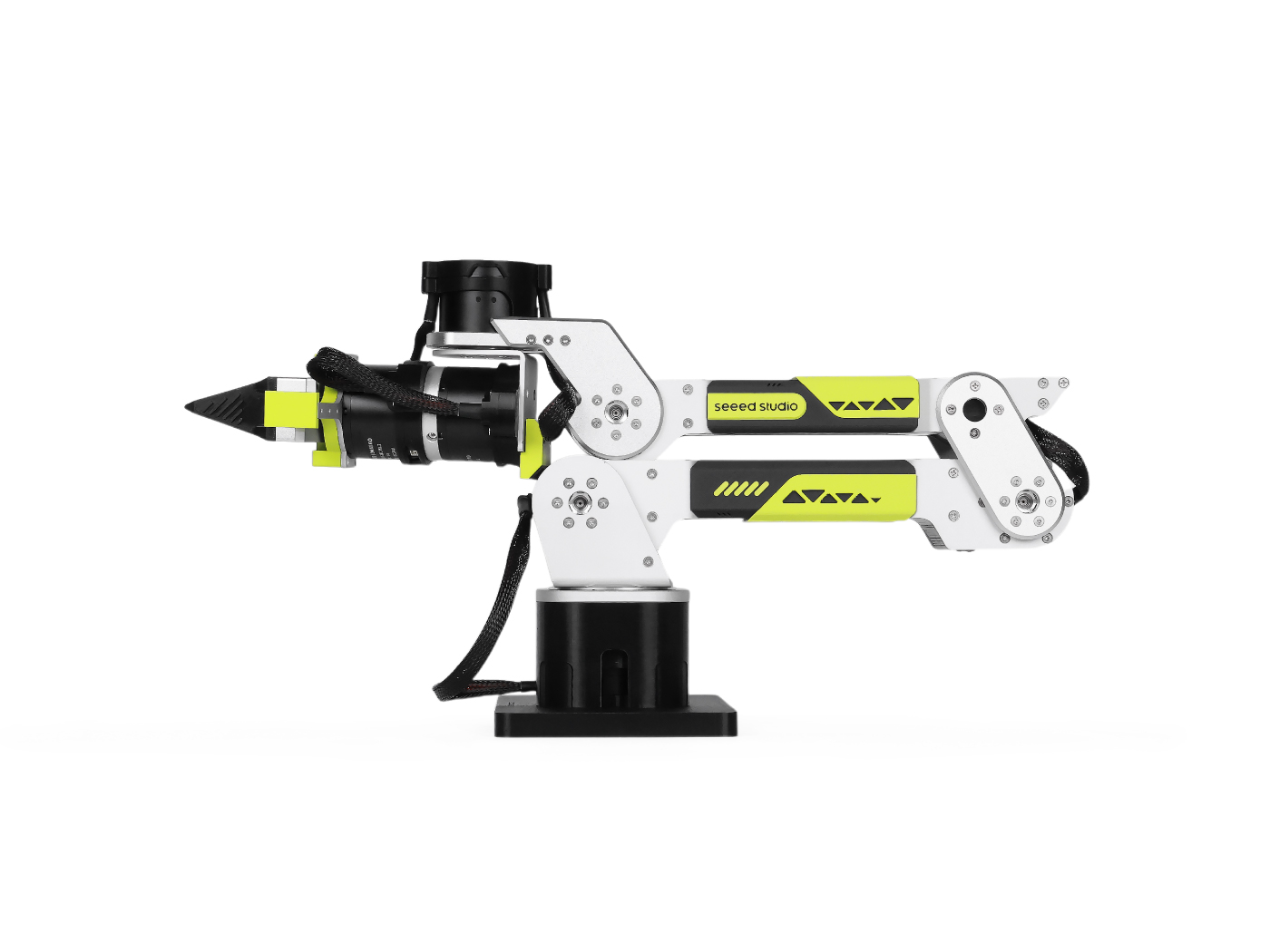
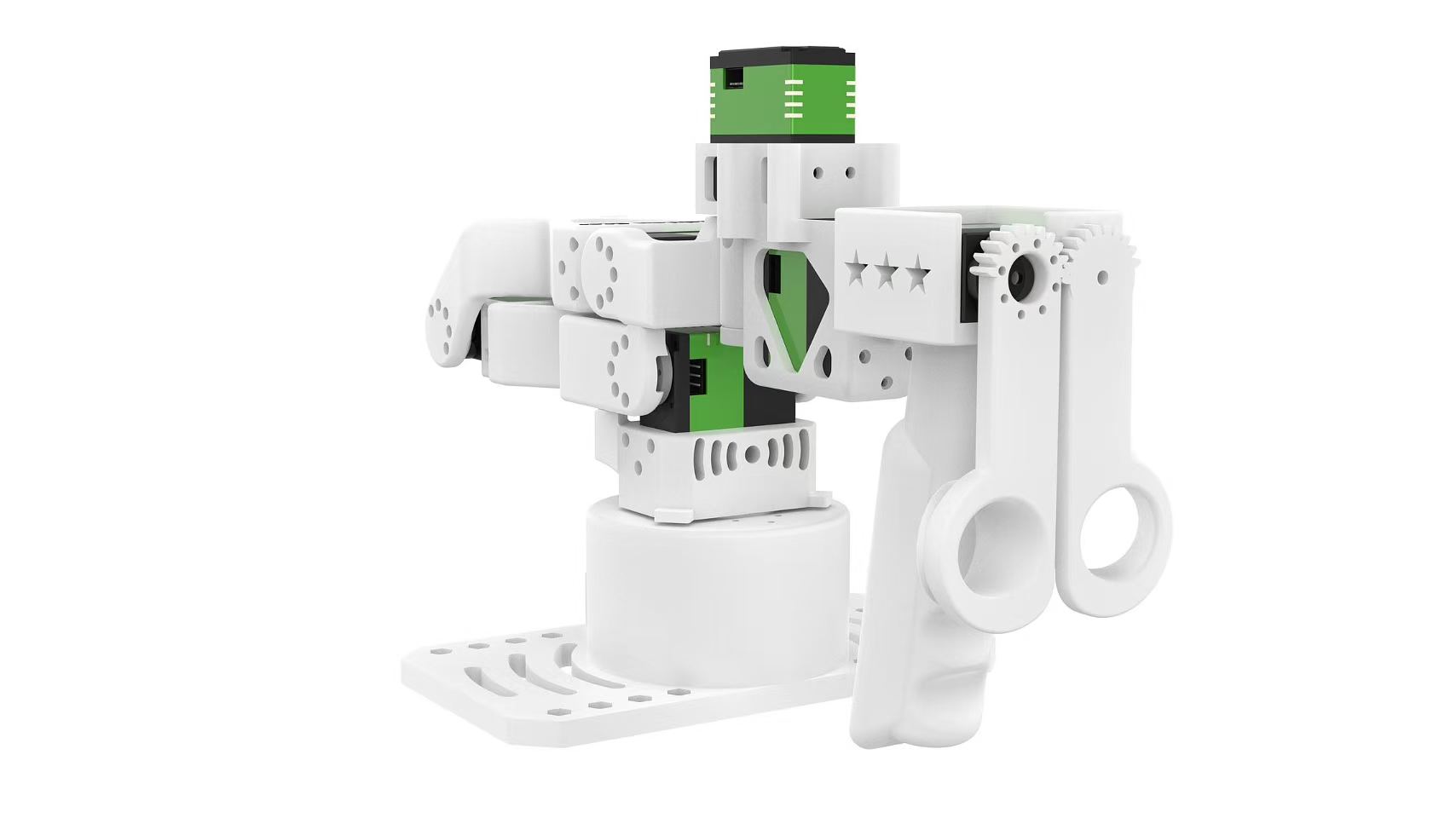 _B601 follower (left) and reBot Arm 102 leader (right). DM and RS followers share the same joint layout and overall appearance but use different motors. Images courtesy of Seeed Studio._
## Hardware and safety
Assemble, wire, and configure the motors using the Seeed Studio guide for your follower: [B601-DM](https://wiki.seeedstudio.com/rebot_arm_b601_dm_lerobot/) or [B601-RS](https://wiki.seeedstudio.com/rebot_arm_b601_rs_lerobot/).
Secure the follower to a stable surface and keep its workspace clear. Support
the arm whenever torque is disabled or the program disconnects because it can
move under gravity. If power or a data cable disconnects during operation,
stop the program, return the leader and follower to their zero positions, then
reconnect and restart.
## Install LeRobot 🤗
Follow the [Installation Guide](./installation), then install reBot support:
```bash
pip install -e ".[rebot]"
```
This installs `motorbridge` for the follower and `motorbridge-smart-servo` for the reBot Arm 102 leader.
## Connect the hardware
DM uses its serial bridge by default and can optionally use native CAN. RS requires native CAN.
| `can_adapter` | Use | Example port |
| ------------- | --------------------------------------- | -------------- |
| `damiao` | Damiao serial bridge; DM only | `/dev/ttyACM0` |
| `socketcan` | MotorBridge native CAN; required for RS | `can0` |
The motor family selects the default adapter. To run DM over native CAN instead, add `--robot.can_adapter=socketcan` and use its CAN channel as `--robot.port`.
### Serial bridge
Use `lerobot-find-port` to identify the DM serial bridge and leader ports. Connect one serial device at a time if their names are difficult to distinguish.
```bash
lerobot-find-port
```
On Linux, remove `brltty` (`sudo apt remove brltty`) if it captures a serial
device. You may also need temporary access with `sudo chmod 666 /dev/ttyACM*
/dev/ttyUSB*`.
### Native CAN
The `socketcan` configuration name is retained across platforms. Linux uses SocketCAN. macOS requires a compatible PCAN adapter and the MacCAN PCBUSB runtime. Windows native-CAN support is experimental and requires a PEAK PCAN adapter and PCAN-Basic. See the [MotorBridge platform setup](https://github.com/motorbridge/motorbridge/tree/v0.5.1) for installation details.
On Linux, configure each native CAN interface at 1 Mbps before connecting an RS follower:
```bash
sudo ip link set can0 down
sudo ip link set can0 type can bitrate 1000000
sudo ip link set can0 up
ip -details link show can0
```
Replace `can0` with the channel provided by your CAN backend. Bimanual native-CAN setups need separate channels such as `can0` and `can1` because both arms use the same motor IDs.
## Device types
| Type | Device |
| ------------------------ | ----------------------------- |
| `rebot_b601_follower` | Single follower |
| `bi_rebot_b601_follower` | Bimanual follower |
| `rebot_102_leader` | Single reBot Arm 102 leader |
| `bi_rebot_102_leader` | Bimanual reBot Arm 102 leader |
`motor_family` defaults to `dm`. In a bimanual configuration, each arm has its own `left_arm_config.*` or `right_arm_config.*` settings and can select its motor family independently.
## Calibration
Calibration sets the current physical pose as the motor zero position and saves a LeRobot calibration file. Place each arm in the zero position shown below with the gripper fully closed, then press ENTER when prompted.
_Follower zero position (left) and leader zero position (right). The DM follower is pictured; the RS follower uses the same joint arrangement._
Reuse the same `--robot.id` and `--teleop.id` in later commands so LeRobot loads the saved calibration. If a calibration already exists, the command lets you reuse it or enter `c` to recalibrate.
### Follower
```bash
lerobot-calibrate \
--robot.type=rebot_b601_follower \
--robot.motor_family=dm \
--robot.port=/dev/ttyACM0 \
--robot.id=follower
```
```bash
lerobot-calibrate \
--robot.type=rebot_b601_follower \
--robot.motor_family=rs \
--robot.port=can0 \
--robot.id=follower
```
Calibration runs for the left follower and then the right follower.
```bash
lerobot-calibrate \
--robot.type=bi_rebot_b601_follower \
--robot.id=bi_follower \
--robot.left_arm_config.motor_family=dm \
--robot.left_arm_config.port=/dev/ttyACM0 \
--robot.right_arm_config.motor_family=dm \
--robot.right_arm_config.port=/dev/ttyACM1
```
For two RS followers, set both families to `rs` and use separate native CAN channels for the two ports. Per-arm calibration files use the `_left` and `_right` suffixes.
### Leader
```bash
lerobot-calibrate \
--teleop.type=rebot_102_leader \
--teleop.port=/dev/ttyUSB0 \
--teleop.id=leader
```
```bash
lerobot-calibrate \
--teleop.type=bi_rebot_102_leader \
--teleop.id=bi_leader \
--teleop.left_arm_config.port=/dev/ttyUSB0 \
--teleop.right_arm_config.port=/dev/ttyUSB1
```
## Teleoperation
Start with small movements and verify every joint direction before using the full workspace.
```bash
lerobot-teleoperate \
--robot.type=rebot_b601_follower \
--robot.motor_family=dm \
--robot.port=/dev/ttyACM0 \
--robot.id=follower \
--teleop.type=rebot_102_leader \
--teleop.port=/dev/ttyUSB0 \
--teleop.id=leader
```
```bash
lerobot-teleoperate \
--robot.type=rebot_b601_follower \
--robot.motor_family=rs \
--robot.port=can0 \
--robot.id=follower \
--teleop.type=rebot_102_leader \
--teleop.port=/dev/ttyUSB0 \
--teleop.id=leader
```
```bash
lerobot-teleoperate \
--robot.type=bi_rebot_b601_follower \
--robot.id=bi_follower \
--robot.left_arm_config.motor_family=dm \
--robot.left_arm_config.port=/dev/ttyACM0 \
--robot.right_arm_config.motor_family=dm \
--robot.right_arm_config.port=/dev/ttyACM1 \
--teleop.type=bi_rebot_102_leader \
--teleop.id=bi_leader \
--teleop.left_arm_config.port=/dev/ttyUSB0 \
--teleop.right_arm_config.port=/dev/ttyUSB1
```
## Record a dataset
Test teleoperation before recording. To add a camera, first identify it with:
```bash
lerobot-find-cameras opencv
```
### Single arm
This example records five DM episodes locally with one OpenCV camera:
```bash
lerobot-record \
--robot.type=rebot_b601_follower \
--robot.motor_family=dm \
--robot.port=/dev/ttyACM0 \
--robot.id=follower \
--robot.cameras='{"front": {"type": "opencv", "index_or_path": 0, "width": 640, "height": 480, "fps": 30}}' \
--teleop.type=rebot_102_leader \
--teleop.port=/dev/ttyUSB0 \
--teleop.id=leader \
--dataset.repo_id=your_username/rebot-dm-test \
--dataset.single_task="Pick up the object" \
--dataset.num_episodes=5 \
--dataset.episode_time_s=30 \
--dataset.reset_time_s=10 \
--dataset.push_to_hub=false \
--display_data=true
```
For RS, change `motor_family` to `rs` and the robot port to the native CAN channel. Remove the camera argument for a motor-only test.
### Bimanual
This DM example records a shared top camera and one wrist camera per arm. The dataset camera keys are `top`, `left_wrist`, and `right_wrist`.
```bash
lerobot-record \
--robot.type=bi_rebot_b601_follower \
--robot.id=bi_follower \
--robot.left_arm_config.motor_family=dm \
--robot.left_arm_config.port=/dev/ttyACM0 \
--robot.right_arm_config.motor_family=dm \
--robot.right_arm_config.port=/dev/ttyACM1 \
--robot.cameras='{
top: {
type: opencv,
index_or_path: "/dev/video2",
width: 640,
height: 480,
fps: 30,
fourcc: "MJPG"
}
}' \
--robot.left_arm_config.cameras='{
wrist: {
type: opencv,
index_or_path: "/dev/video0",
width: 640,
height: 480,
fps: 30,
fourcc: "MJPG"
}
}' \
--robot.right_arm_config.cameras='{
wrist: {
type: opencv,
index_or_path: "/dev/video4",
width: 640,
height: 480,
fps: 30,
fourcc: "MJPG"
}
}' \
--teleop.type=bi_rebot_102_leader \
--teleop.id=bi_leader \
--teleop.left_arm_config.port=/dev/ttyUSB0 \
--teleop.right_arm_config.port=/dev/ttyUSB1 \
--dataset.repo_id=local/rebot-bimanual-dm-camera-test \
--dataset.root=/tmp/rebot-bimanual-dm-camera-test \
--dataset.single_task="Test coordinated movement of both reBot DM arms" \
--dataset.fps=30 \
--dataset.num_episodes=2 \
--dataset.episode_time_s=20 \
--dataset.reset_time_s=10 \
--dataset.push_to_hub=false \
--display_data=false
```
> [!TIP]
> For a bimanual RS setup, set both motor families to `rs` and use separate native CAN channels. A mixed setup can select `dm` for one arm and `rs` for the other.
See [Imitation Learning for Robots](./il_robots) to upload, replay, train, and evaluate a policy.
## Advanced controls
Both builds expose the same joint names and public positions in degrees. LeRobot applies each family's motor direction signs to actions and observations, so policies and teleoperators do not need to convert motor signs.
- DM uses MIT control for the arm and `force_pos` for the gripper by default. `gripper_torque_ratio` defaults to `0.07`; DM also supports `--robot.control_mode=pos_vel`.
- RS uses MIT control and a force-limited impedance gripper because MotorBridge does not provide `force_pos` for RobStride. Depending on measured gripper motion, commanded torque is capped at `3.5` N·m while moving or `1.0` N·m while holding. If feedback fails, LeRobot attempts to command zero gripper torque and then disables the arm.
- `mit_kp`, `mit_kd`, and `pos_vel_velocity` accept either one scalar for every joint or a joint-keyed mapping.
- `max_relative_target` caps the difference between a command and the latest measured position. For example, `--robot.max_relative_target=5.0` limits every commanded joint to a five-degree change.
- `joint_limits` optionally overrides the family defaults in public joint degrees.
Follower motor directions are selected internally from the motor family. The leader's `joint_directions` remain configurable if a teleoperation joint moves in the wrong direction.
DM and RS use the same coordinate convention, but their geometry, gains, and
dynamics differ. Validate policies and datasets before transferring them
between builds.
## Troubleshooting
| Problem | Check |
| ---------------------------------------- | ----------------------------------------------------------------------------------------------------------- |
| Serial device is missing or busy | Reconnect one device at a time, rerun `lerobot-find-port`, check permissions, and remove `brltty` on Linux. |
| Native CAN cannot connect | Check the adapter runtime, channel name, 1 Mbps bitrate, motor power, CAN wiring, and termination. |
| A teleoperated joint moves the wrong way | Stop the program, confirm `motor_family`, and check the leader's `joint_directions`. |
| Calibration is not reused | Use the same robot or teleoperator `id` that was used during calibration. |
For assembly, wiring, and hardware-specific diagnostics, see the Seeed Studio guides for [B601-DM](https://wiki.seeedstudio.com/rebot_arm_b601_dm_lerobot/) and [B601-RS](https://wiki.seeedstudio.com/rebot_arm_b601_rs_lerobot/).